Setup Your API Key
AKI.IO is the European AI inference provider for companies and coders that need control over models, costs, and compliance. Combine inference models operated in Germany with a global model marketplace — all through one serverless API. Trust Levels enforce your control over data sovereignty, performance, and price for every workload.
Our API follows OpenAI and Anthropic-standards to access leading open-weight AI models. Enjoy seamless integration and scalable deployment.
To get started, create a free user account at https://aki.io/signup and top-up your credit balance.
In order to manage your API key, restrict access to certain models or set up a monthly budgt cap, sign in to your user profile.
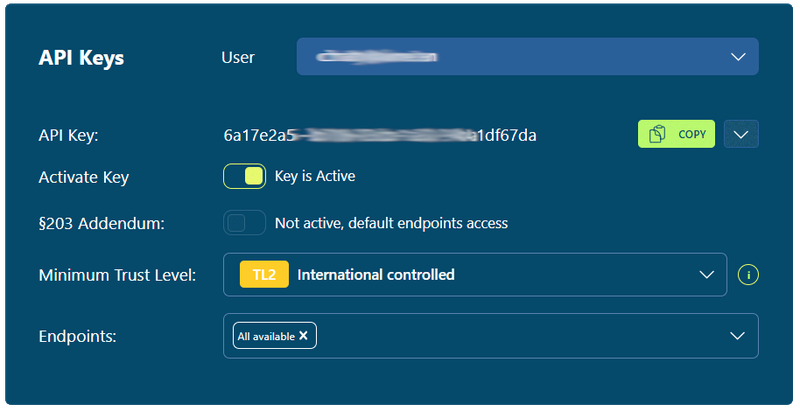
The API key is required for all API requests. The key is bound exclusive to your user account and should not be passed on. Make sure to keep it safe and not expose it by embedding it directly in your public HTML code.
Set Your API Key Trust Level
Each API key must be assigned a "Minimum Trust Level." The Trust Level defines the security and compliance requirements that a model must meet in order to be made available through that key.
A higher Trust Level reduces the number of models available to the key, but ensures that the key can only be used with models and providers that fulfill those security and compliance requirements.
The Trust Levels are defined as follows:
- TL5 – Germany sovereign
- TL4 – EU sovereign
- TL3 – EU resident
- TL2 – International controlled
- TL1 – International standard
- TL0 – Globally unrestricted
For a detailed explanation of the compliance features that each Trust Level provides, see the Trust Levels overview.
A supplementary agreement for individuals bound by professional confidentiality under Section 203 of the German Criminal Code (StGB) is available upon request for all Trust Level 5 models.
Please note, that TL0 and TL1 should only be used to process public (e.g. web search, Wikipedia, open source code, library data, etc.) and are not suitable to process any personal or company related data.
Restrict Your Endpoints
Under "Endpoints" the accessible models can be further restricted. Default is "All available" which enables alle models available for the selected Minimum Trust Level.
To pin the API key to only a set of available models, select them from the drop down list.
The Minimum Trust Level and Endpoints settings also limit which models the Get Models API (/v1/models) returns. In case a model is missing or you get a "model not available" error, confirm that it is selected and meets the minimum required Trust Level.